Timetracker: Time Tracking & Worklog Management for Growing Teams
Track, organize and understand your team's worklogs in Jira — from everyday time logging to structured timesheets and business-ready reporting.
Marketplace - Try for free
Turn Worklogs Into Business Insights
STAGIL Timetracker is a Jira time tracking and worklog management solution for teams that need more structured time data and reporting than basic Jira worklogs provide. Track time with Timesheet, Calendar, Timeline, Issue views and timers, then enrich worklogs with Teams, Accounts, Tags, billable data and custom attributes. Build detailed or summary reports, group and filter worklogs by Jira or custom fields, drill into details, and save, share or export reports. Contributors get flexible ways to log time, while managers get structured data for project, team, customer and billing-related reporting. With Jira-native permissions, Google Calendar integration and the Timetracker Rovo Agent, Timetracker connects everyday time tracking with the business information teams need.
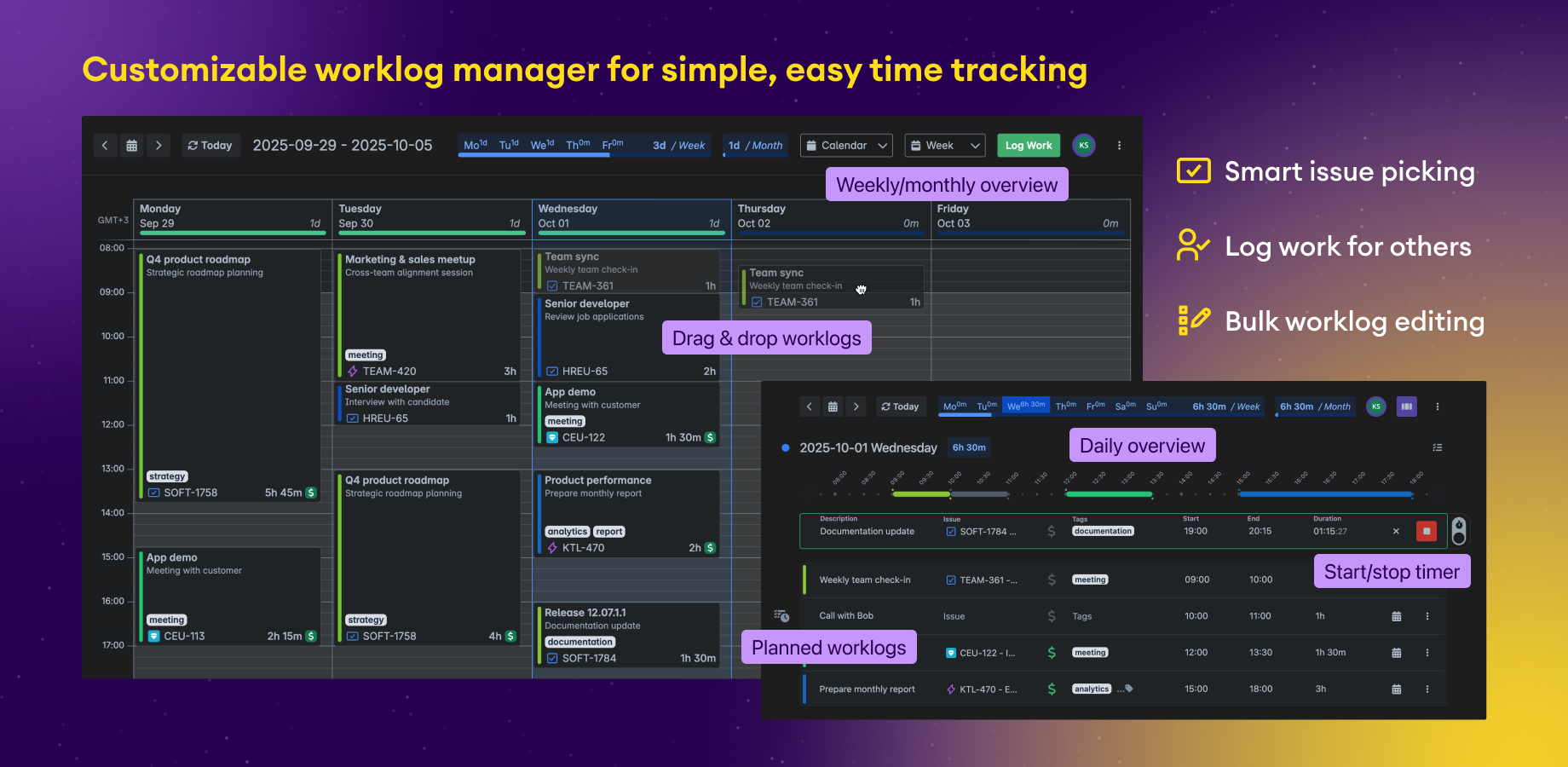
Track Time Your Way
Give contributors flexible ways to record and manage worklogs directly in Jira.
- Calendar, Timeline, Timesheet and Issue views
- Start/stop timers
- Daily, weekly and monthly time overviews
- Worklog entry and editing in supported views
Structure Your Worklogs
Add business context to time data with Teams, Accounts, Tags, billable data and custom worklog attributes.
- Categorize work with Tags
- Organize time by Teams and Accounts
- Capture additional details with custom attributes
- Use supported fields to organize and analyze worklogs
Turn Worklogs Into Reports
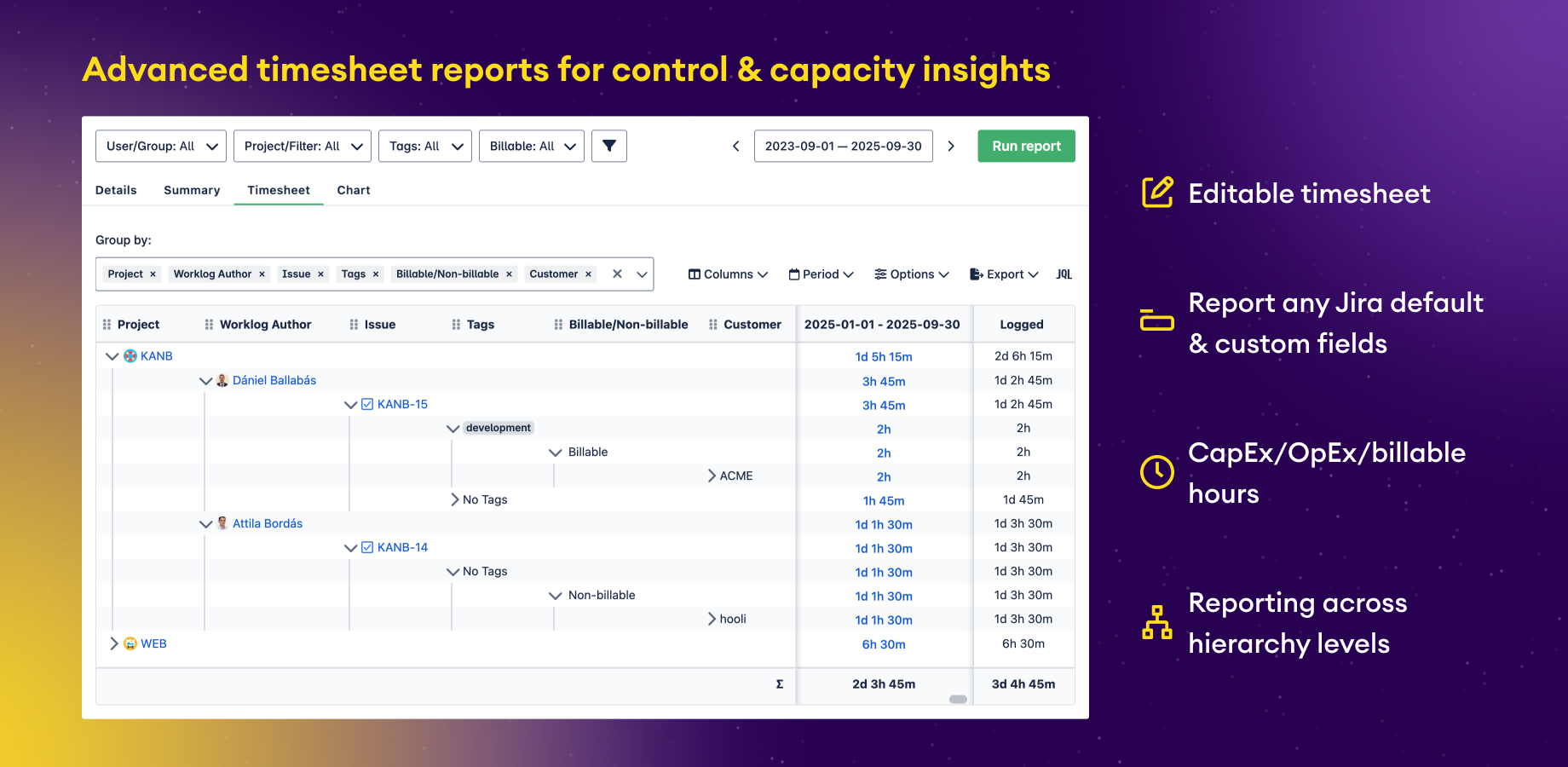
Create detailed or summary reports that help you understand how time is distributed across projects, teams and business dimensions.
- Group and filter by Jira or custom fields
- Drill down into individual worklogs
- Explore totals and available chart views
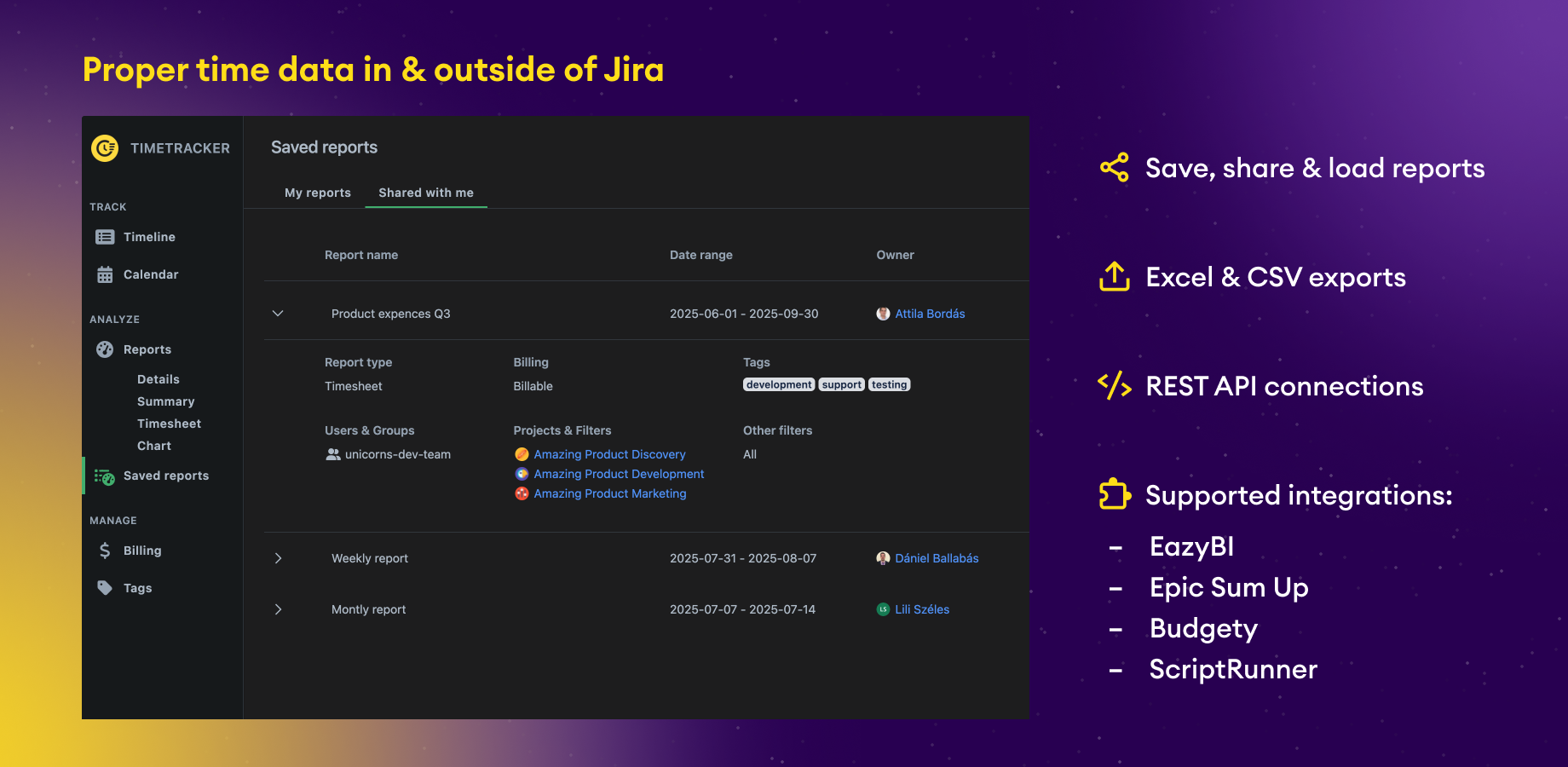
- Save, share and export reports
What are users say about us:
-
Read Reference"The option of booking time on a separate time tracker calendar page is very helpful and is very much appreciated by the team and me. The options for r..."
-
Read Reference"Great app! The best tool for tracking time and creating reports in Jira projects."
-
Read Reference"Great app! It's perfect to track time on projects and the fact that we can export to Excel and run more in-depth reports and analysis is also very hel..."
-
Read Reference"Great app! With the recent updates (year 2023) the app is completely suitable to use Timetracker instead of Tempo in our company."
-
Read Reference"It works great, and their support is top-notch."
-
Read Reference"The app works great for regular time tracking purposes. It's not automatic, but the UX is very easy to use for our devs. Also, logging our work actual..."
-
Read Reference"I have been using this Plugin for over a year to manage my time tracking. I love the calendar view, the possibility to add repeating entries (e.g. for..."
-
Read Reference"Its just way better than built in Jira time tracking imo"
Track time the way your team works
Multiple ways to record time. One place to understand it.
Different people work differently. Some prefer a timer, others review their day in a calendar, and project teams may need a timeline to manage and edit worklogs efficiently.
STAGIL Timetracker gives your team multiple ways to record and manage time while keeping the resulting worklog data available for reporting.
- Timer and issue-based time tracking - Record time directly in your Jira workflow or use a timer to measure work as it happens.
- Calendar view - Review and manage worklogs in a calendar-based interface to get a clearer picture of your recorded work.
- Timeline view - Navigate worklogs across days and review logged hours over daily, weekly and monthly periods.
- Timesheet view - Explore recorded time in a structured report, with configurable grouping and additional columns.
Structure your worklogs
Add the Business Context Your Worklogs Need
Jira worklogs record time, but organizations often need additional information to make that time useful for reporting.
Timetracker lets you organize worklogs with Teams, Accounts, Tags, billable data and custom worklog attributes. These dimensions help you structure recorded time around the way your teams, projects and customer-related processes operate.
 Teams — Analyze worklogs across teams and delivery groups.
 Accounts — Organize time around customers or other business entities.
 Tags — Categorize activities for more flexible filtering and reporting.
 Custom worklog attributes — Capture additional business-specific information using supported attribute types.
 Billable data — Support billing-related reporting and the categorization of customer work.
Powerful Jira time tracking reports
Understand where your team's time goes
STAGIL Timetracker provides reporting capabilities that help project managers, team leads and operations teams analyze worklogs across people, projects and business dimensions.
With configurable Jira time reports, you can:
- Filter worklogs by users, groups, projects and other supported criteria.
- Group data by projects, issues, users, teams, accounts and supported custom fields.
- Add relevant worklog details as report columns.
- Review timesheets and detailed worklog records.
- Export report data for further analysis and downstream processes.
- Use worklog information to support project reviews, customer reporting and billing-related workflows.
Who is Timetracker for?
Worklog Management for Jira Teams
- Software and product teams - Track time against Jira work, manage worklogs and understand effort across projects.
- Project managers and team leads - Review timesheets, explore worklog details and prepare reports about recorded team effort.
- Consulting and professional services - Organize time by account, project and activity to support customer-related and billing-related reporting.
- Operations and management - Use structured worklog data to analyze how recorded time is distributed across projects, teams and business dimensions.
- Jira administrators - Configure available permissions and worklog management capabilities to fit the team's requirements.
Integrations and Connected Workflows
 Connect Timetracker to Your Workflows
Timetracker brings time tracking and worklog reporting into your Jira environment, with integrations that help you connect time data to the tools and workflows your organization relies on.
 REST API — Integrate with Your Tools and Systems
Connect Timetracker with external applications, automation workflows, reporting platforms and business systems using its REST API. Build integrations around your requirements (BI platform, an accounting system, an internal application or a custom workflow), automate worklog-related processes.
 Google Calendar Integration
Bring calendar information into your time-tracking workflow. View supported Google Calendar events alongside worklogs to help users review their schedules and record time in context.
 Timetracker Rovo Agent
Use supported natural-language interactions to work with Timetracker data and actions. The Rovo Agent helps make time-tracking workflows accessible through conversational requests, using the capabilities exposed by the integration.
Use Cases — Put Your Worklog Data to Work
Timetracker helps you go beyond recording hours. Structure worklogs around your business needs, understand how time is spent, and turn recorded effort into useful reports.
1. Understand Where Your Team's Time Goes
Measure effort across activities, projects and teams.
Use Tags to categorize work such as development, testing, code reviews, meetings and support. Combine them with flexible reporting to see which activities consume the most time, compare effort across projects, and identify opportunities for improvement.
2. Track Billable and Non-Billable Work
Know what can be charged to customers — and where time is being spent without generating billable revenue.
Mark worklogs as billable or non-billable, and use Tags to identify invoices, special billing categories or invoiced work. Report on billable hours by customer or project, review non-billable effort, and support your existing billing and invoicing processes.
3. Organize Worklogs Around Customers and Teams
Structure time data to match the way your organization works.
Use Accounts to organize worklogs around customers or business relationships, and Teams to report on work performed by different groups. Filter, group and compare worklogs to understand effort across customers, teams and projects — with the context needed for meaningful reporting.
4. Capture Business-Specific Worklog Details
Collect more than time spent. Capture the context that matters to your business.
Add custom worklog attributes such as activity type, engagement type, department, cost center or campaign. Use these fields to filter, group and analyze worklogs without relying solely on descriptions or standard Jira fields.
5. Build Reports for Your Business Needs
Turn structured worklog data into reports you can actually use.
Create detailed, summary and timesheet reports using Jira fields, Tags, Teams, Accounts, billing information and custom attributes. Choose the filters, columns and grouping levels that suit your needs, then save, share or export reports for project reviews, customer reporting and further analysis.
6. Connect Time Tracking to Your Existing Systems
Make your worklog data useful beyond Jira.
Use the Timetracker REST API to connect supported worklog data and operations with external applications, reporting platforms and business systems. Build custom integrations and automate relevant workflows around the way your organization manages time.
Use Timetracker for:
Reports & Dashboards

Project Management
Time Tracking
Cost tracking
Resource Planning

HR Service

Try Timetracker on your own through starting a trial via the Atlassian Marketplace, or book a demo with us to get a headstart on your usage of the app.
Just fill out the form below and we will contact you about scheduling a call.